
One workspace for creative production, client work, and everyday life.
Synotic Digital Apps is an all-in-one professional management platform for musicians, DJs, performers, entertainers, studios, venues, production companies, vendors, and individuals. Manage gigs and booking requests, send and sign contracts, issue invoices, plan tours and setlists, coordinate crews and equipment, share press kits, message clients and fans, and run your schedule — all from one account.
Every workspace is organized into an edition — Life, DJ, Artist, Entertainer, Studio, Venue, Enterprise, or Vendor — so the menus, modules, and permissions you see match your line of work.
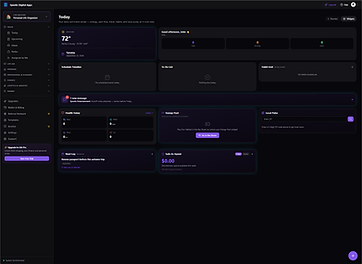
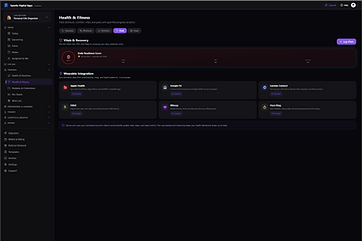
What you can do with Synotic Digital Apps
Everything below is part of the same account. Add the editions that fit your work and the modules you need appear in your workspace.
Scheduling & calendars
Day, week, and month schedules, tour stops, availability checks, and project timelines. Connect Google Calendar or Outlook and keep events in sync both ways.
Bookings, clients & crews
Booking requests and offers, e-signed contracts, riders, client profiles, band and crew rosters, venue and equipment coordination — with every activity logged.
Invoices & money
Generate invoices from bookings, track expenses and payments, manage budgets and bills, and keep a referral and wallet view of your account.
Assets, files & press kits
A central asset hub for media, documents, and templates, plus public press kits (EPK), setlists, promo galleries, and fan club tools.
Unified inbox & messaging
Direct messages, project invites, social DMs, and connected email in one inbox, with in-app chat, group rooms, and circles for the people you work with.
Permission-based access
Each workspace keeps its own records. Collaborators are invited into specific projects and granted only the access they need — one client's work is never visible to another.
Insights & reporting
Audience and streaming analytics, social performance, sales and revenue summaries, and task completion tracking for the work that matters most.
Personal life tools
In the Life edition: tasks, budgets, bills, groceries, travel planning, habits, health and fitness tracking, collections, and games for downtime.
Editions built for how you work
Choose the editions that match your profession. Your account, calendar, and identity are shared across all of them, so one login reaches every workspace you subscribe to.
Life Edition
Personal and family organization — tasks, budgets, bills, groceries, travel, habits, health.
DJ Edition
Gigs and event portals, crate and library management, track analysis, crowd requests, booth tools.
Artist Edition
Tours and bookings, contracts, EPK and press, setlists, fan club, streaming and social analytics.
Entertainer Edition
Performance calendars, bookings, media and promo management for performers and acts.
Studio Edition
Session scheduling, projects, assets, and client work for recording and production studios.
Venue Edition
Event calendars, booking coordination, staff and vendor scheduling for venues.
Enterprise Edition
Event and film production at scale — crews, logistics, budgets, and multi-project oversight.
Vendor Edition
Equipment and service catalogs, availability, and coordination with productions and venues.
How we use your Google data
Synotic Digital Apps offers Google sign-in and optional Google integrations. Here is exactly what we request and why. Gmail and Google Calendar connections are always started by you, are never required to use the app, and can be turned off at any time.
Sign in with Google
When you create an account with Google, we receive your name, email address, and profile picture. We use them only to create your account, sign you in, and identify you inside your workspace.
Gmail (read-only, optional)
If you choose to connect Gmail, we read the sender, subject line, date, and snippet of the messages in the mailbox you select so they can appear in your unified inbox. We request read-only access — we do not send, delete, archive, or modify your email.
Google Calendar (read-only, optional)
If you choose to connect Google Calendar, we read the events on the calendar you select so your schedule appears alongside the app's own planning tools. We request read-only access — we do not create, edit, or delete calendar events.
We never sell your data and never use Google user data for advertising.
Access tokens are stored securely and used only to provide the features you switched on.
You can disconnect Gmail or Google Calendar at any time from Settings → Connections, which stops the sync and removes the stored token.
Google API Services User Data Policy — Limited Use
The use of raw or derived user data received from Google Workspace APIs will adhere to the Google User Data Policy, including the Limited Use requirements.
Google user data — raw, aggregated, anonymised, or derived — is never used, transferred, or sold to create, train, or improve foundational or generalised AI or machine-learning models, and is never sent to a third-party AI service. Our AI-assisted features run only on the content you deliberately submit for that task, which never includes Gmail or Google Calendar data.
Full details are in our Privacy Policy and Terms of Service.